How to draw a face at 8 x 8 pixels
Where the eyes, brows, mouth and hair go on a skin's 8 x 8 face, how to show glasses, beards and expressions, and the mistakes that make a face look wrong.
A skin's face is the front of the head: 8 pixels wide and 8 tall, at x 8 to 15, y 8 to 15 of the texture. Sixty-four pixels is not much, so every one counts. The pattern below is the one Scan2Skin 3D draws from photos, and it is a good starting point for drawing a face by hand.
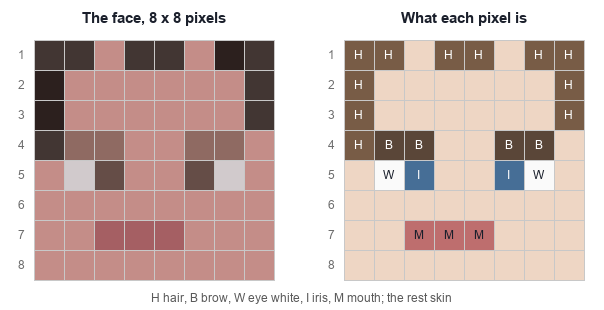
Where everything goes
| Rows from the top | What goes there |
|---|---|
| 1 to 3 | Hair across the top and down the sides; the forehead in skin |
| 4 | The brows, two pixels each, above the eyes |
| 5 | The eyes: a white pixel on the outside and the iris on the inside, two pixels apart in the middle |
| 6 | Skin; a nose is usually left out, or drawn one shade darker |
| 7 | The mouth, two or three pixels |
| 8 | The chin in skin, or a beard |
Tips
- Use two shades of skin: the main tone and one a little darker for the chin row or the sides. Avoid outlines.
- Keep the eyes level and symmetrical: one pixel off reads as a wink.
- Make the brows a shade darker than the hair, or they merge with it.
- The iris color shows best next to a white pixel.
- Hair over the forehead changes the face more than any other pixel: try one row, then two.
- Glasses: a frame color around the eye row, or on the hat layer so they stand out a little.
- A beard: the chin row and the cheeks beside the mouth in the beard color.
- Expressions: a wider mouth reads as a smile; brows that slope toward the middle read as angry.
Common mistakes
- Eyes too far apart, or touching the edge of the face.
- A mouth as wide as the face.
- Transparent pixels in the face: holes in the base layer turn into solid patches.
- Forgetting the sides and back of the head: they show as soon as the player turns.
The face's place on the texture, and the head's other sides, are in the 64 x 64 layout. For colors and patterns, see the design tips.
Make a skin now, in your browser: five guided photos with the camera, or photos already taken. Nothing is uploaded. The Scan2Skin 3D app for iPhone and Android adds scan yourself, HD skins and Pro.
Make a skin About the phone app