Classic or Slim arms: which skin model to choose
The two player models differ only in arm width: 4 pixels for Classic, 3 for Slim. How that changes the texture, what the menus call them, and how to choose.
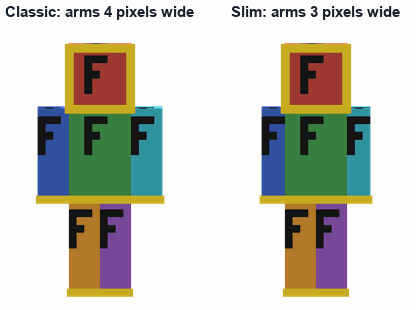
Every custom skin is worn on one of two player models. They are the same in every way except the arms: Classic arms are 4 pixels wide and Slim arms are 3. Choosing the wrong one does not break anything, but the arms then show a stripe of stray pixels or lose a column of the drawing, so it is worth getting right.
What the menus call them
- Java Edition, on the profile website: Classic and Slim.
- Java Edition, in the Launcher's Skins tab: Wide and Slim. Wide is Classic.
- Bedrock Edition, when importing: Classic and Slim.
- Skin packs: the standard geometry and the slim geometry (geometry.humanoid.custom and geometry.humanoid.customSlim).
What changes in the texture
The arms use the same areas of the 64 x 64 texture on both models, but each face of the arm is one column narrower on Slim, so the faces shift left and the last two columns of each arm area are left empty. Here is the right arm's base layer:
| Face of the right arm | Classic (x, inclusive) | Slim (x, inclusive) |
|---|---|---|
| Top | x 44 to 47 | x 44 to 46 |
| Underside | x 48 to 51 | x 47 to 49 |
| Outer side | x 40 to 43 | x 40 to 43 |
| Front | x 44 to 47 | x 44 to 46 |
| Inner side | x 48 to 51 | x 47 to 50 |
| Back | x 52 to 55 | x 51 to 53 |
That is why a skin drawn for one model looks wrong on the other: on the wrong model, the game reads the faces from the wrong columns. Converting a skin means moving every arm face, and for Slim to Classic, drawing one extra column of each face.
How to choose
- The model is a style choice, not a body type. Choose the arms that look right with the clothes: Slim suits fitted sleeves, Classic suits sweaters and jackets.
- If someone else drew the skin, use the model it was drawn for; it is usually in the file name or the download page.
- Skins from Scan2Skin 3D come in both: the file names end in _classic or _slim, and both are drawn from the same photos, so you can try each.
Older versions
Slim arms arrived in Java Edition 1.8. In older versions a slim skin shows black pixels on the arms, so use Classic there.
Make a skin now, in your browser: five guided photos with the camera, or photos already taken. Nothing is uploaded. The Scan2Skin 3D app for iPhone and Android adds scan yourself, HD skins and Pro.
Make a skin About the phone appSources
- Make a Custom Skin in Minecraft: Java Edition, Minecraft Help Center. Read October 4, 2026; the article was last edited 2026-01-30: the Launcher's Skins tab, the profile's Change Your Skin page, Classic, Wide and Slim, slim arms from version 1.8.
- What is a Minecraft Skin?, minecraft.net. Read October 4, 2026; published 2023-06-05: the Skins tab, the classic (4-pixel arms) and slim (3-pixel arms) models.
- Skin Pack JSON Formatting and Localization Reference, Microsoft Learn. Read October 4, 2026; last updated 2025-08-12: the standard and slim geometries; 64 x 64 recommended, 64 x 32 legacy.